WARNING: the output might be too long to paste it on the “text entry” tab 😕So, you need to copy and paste the output to a text file as you go through the session.
Start with the original data.txt file. 😀
Submit the text file from the output.
Follow these steps:
a. Start your application, copy and paste the output. The raw data will be used here and only once while the application is running: The Business’s first Operation. At the end of each business cycle, the data file should be updated so subsequent starts of the application will have the current state of the inventory.
b. Select the “Business” option and paste the output.
c. Select the “Inventory” option and paste the output.
d. Without restarting your program, go back to the main menu and select the “Shopper” option and paste the output. e. Shoppers activity:
Shopper 1 –Sunkist – 2 units –Coke — 3 units
Shopper 2 –Chips — 4 units –Oreo Cookies — 1 unit
Shopper 3 –Water — 2 units –Nutrigrain Bar — 3 units
Shopper 4 –Fruit Snack — 5 units
Copy and paste the output to the text file.
f. Without restarting your program, go back to the main menu and select “Business” option (copy and paste the output).
g. Select the “Inventory” option (copy and paste the output).
h. Close your application and show the end of the business message (copy and paste the output).
i. Start your application again and do parts “a” through “c” above (copy and paste the output).
j. Close your application and show the end of the business message (copy and paste the output).
Reading from the data file can be part of the Final Implementation. At this stage, it is more important that you implement the Business aspect of the application.
a. Start your application by reading the raw data from the data.txt file to the content array.
b. Display the raw data line by line.
c. Display the content of the array in well-aligned rows and columns
Chips 45 25 0.75
Popcorn 45 22 0.75
Pop Corners 45 22 0.75
…
The data in this file is as follows: The name of the item, the available quantity, the cost per case of 45, and the sale price of the item.
Copy and paste the terminal activity including the display of the raw data and array content in the Text Entry. A grade of zero will be given if this item is not in the Text Entry tab.
Include documentation in any file you create.
Your files do not need to have your initials. Only the zip file requires the name of the project with your initials.
Your static main method can not be a method in the ADT. You need to create a tester/driver class.
Header:
Assignment description ( you can copy and paste the assignment itself)
All authors’ names and the business name.
Language and version
Date of completion
Help with formatting printing:
If you have to print multiple fields, here is an example:
The raw data file will be used here and only once: The Business’s first Operation ever. Subsequent starts of the application will not need to use this file.
These are activities that might take place on a given day:
a. “Business” is selected.
b. “Inventory” is selected.
c. Without restarting the application, it goes back to the main menu.
d. “Shopper” is selected:
Shopper 1 –Sunkist – 2 units –Coke — 3 units
Shopper 2 –Chips — 4 units –Cookies — 1 unit
Shopper 3 –Water — 2 units –Veggie-Sticks — 3 units
Shopper 4 –Fruit Snack — 5 units
e. Without restarting the application, it goes back to the main menu and the “Business” option is selected.
f. Business manager ends the business cycle and your application writes back to the database the current state of the vending machine.
g. Next business cycle starts and the business manager checks the inventory reflects the current state of the vending machine.
ArrayList
Constructs an empty list with an initial capacity of ten.
boolean add(E obj)
Appends the specified element to the end of this list.
void add(int index, E obj)
Inserts the specified element at the specified position in this list.
E get(int index)
Returns the element at the specified position in this list.
int indexOf(Object obj)
Returns the index of the first occurrence of the specified element in this list, or -1 if this list does not contain the element.
boolean isEmpty()
Returns true if this list contains no elements.
int size()
Returns the number of elements in this list.
ListIterator<E> listIterator()
Returns a list iterator over the elements in this list (in proper sequence).
E remove(int index)
Removes the element at the specified position in this list.
boolean remove(Object o)
Removes the first occurrence of the specified element from this list, if it is present.
Resources
ListIterator, indexOf, Iterator, List Interface
[collapse]
//********************************************************************
//  DestinysChild.java       Author: Lewis/Loftus/Cocking
//
//  Demonstrates the use of a ArrayList object.
//********************************************************************

import java.util.ArrayList;

public class DestinysChild
{
   //-----------------------------------------------------------------
   //  Stores and modifies a list of band members.
   //-----------------------------------------------------------------
   public static void main (String[] args)
   {
      ArrayList band = new ArrayList();

      band.add ("Michelle");
      band.add ("Kelly");
      band.add ("Beyonce");
      band.add ("Farrah");

      System.out.println (band);

      int location = band.indexOf ("Farrah");
      band.remove (location);

      System.out.println (band);
      System.out.println ("At index 1: " + band.get(1));

      System.out.println (band);
      System.out.println ("Size of the band: " + band.size());
   }
}
[Michelle, Kelly, Beyonce, Farrah] [Michelle, Kelly, Beyonce] At index 1: Kelly [Michelle, Kelly, Beyonce] Size of the band: 3
Two ways to iterate through the elements of a collection in java:
By Iterator interface.
By for-each loop.
//********************************************************************
//  Recipe.java       Author: Lewis/Loftus/Cocking
//
//  Demonstrates the use of a ListIterator to iterate through the
//  elements of an ArrayList.
//********************************************************************

import java.util.ArrayList;
import java.util.ListIterator;

public class Recipe
{
   //-----------------------------------------------------------------
   //  Stores and then prints a list of ingredients for a recipe.
   //-----------------------------------------------------------------
   public static void main (String[] args)
   {
      ArrayList<String> ingredients = new ArrayList<String>);

      ingredients.add ("flour");
      ingredients.add ("sugar");
      ingredients.add ("cocoa");
      ingredients.add ("oil");
      ingredients.add ("butter");
      ingredients.add ("eggs");
      ingredients.add ("baking soda");

      System.out.println ("To make a chocolate cake, use the following " +
         ingredients.size() + " ingredients:");

      // traversing ArrayList by Iterator
      ListIterator<String> iterator = ingredients.listIterator();
      while (iterator.hasNext())
         System.out.println(iterator.next());

      // traversing ArrayList using the "for-each" loop
       for(String obj:ingredients)
          System.out.println(obj);

   }
}
To make a chocolate cake, use the following 7 ingredients: flour sugar cocoa oil butter eggs baking soda
Assignments: 1. Create a class DataSet of BankAccounts. The constructor creates an ArrayList of BankAccount(s). Write the test class to add, delete and print (use the for-each loop) bank accounts. Your driver should have at least 3 BankAccount objects. Make any changes necessary to have the DataSet ADT implemented with an ArrayList. Also, change the comments to fit the modifications to the it.
DataSet with ArrayList
/**
Computes the average of a set of data values.
*/
public class DataSet
{
/**
Constructs an empty data set with no BankAccount objects.
*/
public DataSet()
{
sum = 0;
count = 0; // Warning: Is "count" necessary?
maximum = 0; // Warning: this should not be a numeric type!!
// create an object of the ArrayList dataSet
}

/**
Adds a BankAccount object to the data set
@param x a BankAccount object
*/
public void add(BankAccount bank)
{
// add object to ArrayList
sum = sum + bank.getBalance();
if (count == 0 || maximum.getBalance() < x.getBalance()) maximum = x;
count++;
}

/**
Gets the average of the added BankAccount balances.
@return the average or 0 if no data has been added
*/
public double getAverage()
{
if (count == 0) return 0;
else return sum / count; // Warning
}

/**
Gets the largest of the added data. // changes must be made here
@return the maximum or 0 if no data has been added
*/
public BankAccount getMaximum()
{
return maximum;
}

/**
Prints the balance for each element of the added data in the ArrayList.// Warning
@return the average or 0 if no data has been added
*/
public void printDataSet()
{
// implement the code to print the elements of the ArrayList datSet. Add more specific comments
// use the for-each loop
}

private double sum;
private BankAccount maximum;
private int count;
private ArrayList<BankAccount> dataSet;
}
[collapse]
Create a class Purse (see below) that contains an ArrayList of Coin(s). Write the test class to add, delete, and print coins. Make any changes necessary to have the Purse class implemented with an ArrayList. Also, change the comments to fit the modifications to the ADT.
/**
A coin with a monetary value.
*/
public class Coin
{
/**
Constructs a coin.
@param aValue the monetary value of the coin.
@param aName the name of the coin
*/
public Coin(double aValue, String aName)
{
value = aValue;
name = aName;
}

/**
Gets the coin value.
@return the value
*/
public double getValue()
{
return value;
}

/**
Gets the coin name.
@return the name
*/
public String getName()
{
return name;
}

public boolean equals(Object otherObject)
{
Coin other = (Coin)otherObject;
return name.equals(other.name)
&& value == other.value;
}

private double value;
private String name;
}
Modify the Purse class to be implemented with ArrayList<Coin> and to use a for-each loop. Implement the following methods in the Purse class:
 /**
Counts the number of coins in the purse
@return the number of coins
*/
public int count()
{

}

/**
Tests if the purse has a coin that matches
a given coin.
@param aCoin the coin to match
@return true if there is a coin equal to aCoin
*/
public boolean find(Coin aCoin)
{

}

/**
Counts the number of coins in the purse that match
a given coin.
@param aCoin the coin to match
@return the number of coins equal to aCoin
*/
public int count(Coin aCoin)
{

}

/**
Finds the coin with the largest value.
(Precondition: The purse is not empty)
@return a coin with maximum value in this purse
*/
pulic Coin getMaximum()
{

}
NOTE: Use the “for-each” loop in the implementation.
import java.util.ArrayList;

/**
   This bank contains a collection of bank accounts.
*/
public class Bank
{
   /**
      Constructs a bank with no bank accounts.
   */
   public Bank()
   {
      accounts = new ArrayList<BankAccount>();
   }

   /**
      Adds an account to this bank.
      @param a the account to add
   */
   public void addAccount(BankAccount a)
   {
      accounts.add(a);
   }

   /**
      Gets the sum of the balances of all accounts in this bank.
      @return the sum of the balances
   */
   public double getTotalBalance()
   {
      double total = 0;
      for (BankAccount a : accounts)
      {
         total = total + a.getBalance();
      }
      return total;
   }

   /**
      Counts the number of bank accounts whose balance is atLeast a given value.
      @param atLeast the balance required to count an account
      @return the number of accounts having least the given balance
   */
   public int count(double atLeast)
   {
      int matches = 0;
      for (BankAccount a : accounts)
      {
         if (a.getBalance() >= atLeast) matches++; // Found a match
      }
      return matches;
   }

   /**
      Finds a bank account with a given number.
      @param accountNumber the number to find
      @return the account with the given number, or null if there
      is no such account
   */
   public BankAccount find(int accountNumber)
   {
      for (BankAccount a : accounts)
      {
         if (a.getAccountNumber() == accountNumber) // Found a match
            return a;
      }
      return null; // No match in the entire array list
   }

   /**
      Gets the bank account with the largest balance.
      @return the account with the largest balance, or null if the
      bank has no accounts
   */
   public BankAccount getMaximum()
   {
      if (accounts.size() == 0) return null;
      BankAccount largestYet = accounts.get(0);
      for (int i = 1; i < accounts.size(); i++)
      {
         BankAccount a = accounts.get(i);
         if (a.getBalance() < largestYet.getBalance())
            largestYet = a;
      }
      return largestYet;
   }

   private ArrayList<BankAccount> accounts;
}
/**
 * mrs.e
 * 12/14/2018
 *
 * ArrayLists
 * for-each loop
 * Iterator
 *
 * */

import java.util.ArrayList;
import java.util.Iterator;

public class ArrayListIterator
{
   public static void main( String[] args )
   {
      // add elements to an ArrayList
      String[] pets = { "Puppy", "Kitten", "Gerbil", "Bunny", "Ferret" };
      ArrayList<String> aList = new ArrayList<String>();

      for ( String pet : pets )
         aList.add( pet ); // for each loop - don't change the ArrayList

      // add elements in removePets array to removeList
      String[] removePets = { "Gerbil", "Bunny" };
      ArrayList<String> removeList = new ArrayList<String>();

      for ( String pet : removePets )
         removeList.add( pet );

      // print items of the list
      System.out.println( "ArrayList: " );

      for ( int count = 0; count < aList.size(); count++ )
         System.out.printf( "%s ", aList.get( count ) );

      // remove from list the pets contained in removeList
      removePets( aList, removeList );

      // print items of the list
      System.out.println( "\n\nArrayList after calling removePets: " );

      for ( String pet : aList )
         System.out.printf( "%s ", pet );
   } // end main

   // remove pets in collection2 found in collection1
   private static void removePets( ArrayList<String> collection1,
      ArrayList<String> collection2 )
   {
      // get iterator
      Iterator<String> iterator = collection1.iterator();

      // loop while collection has items
      while ( iterator.hasNext() )
      {
         if ( collection2.contains( iterator.next() ) )
            {
            iterator.remove(); // remove current pet
            }
      } // end while
   } // end method removePets
} // end class ArrayListIterator
There are lots of reasons for choosing one sorting algorithm over another. We might choose an algorithm because it is simple, fast, uses less memory, or works well on the kind of data we have. An algorithm that is easier to understand is also easier to write and debug. However, often the simplest sorts are not efficient. Efficiency is usually the first thing we look for.
We can compare algorithms in terms of time and space efficiency.
Space efficiency refers to the amount of space that an algorithm uses. An algorithm that uses less space and runs faster is more efficient.
We measure efficiency by the size of the input. For a sorting algorithm the input is the array of elements to be sorted, so the size of the input is the number of elements. We will use n for the number of elements being sorted.
We can measure the time efficiency of an algorithm by counting how many statements get executed when the algorithm runs.
We are most interested in how the running time grows as the size of the input grows, so we can ignore statements that get executed the same number of times each time the algorithm is run.
Instead we look at those statements that get executed a different number of times depending on the size of the input.
In sorting algorithms, the common operation is a comparison, so we usually count comparisons when we consider sorting algorithms.
As the number of elements to be sorted grows, the number of comparisons required grows as well.
We want to find the relationship between the two growth rates.
The selection sort has an outer loop that runs n-1 times, where n is the size of the input array.
The inner loop runs a variable number of times, ranging from 1 to n-1, depending on the index of the outer loop.
So, we can say that the time efficiency of the selection sort algorithm is on the order of n^2.
We use big-oh notation saying that selection sort is O(n^2). This means that the running time of the selection sort algorithm will be no worse than on the order of n^2 units of time, where n is the size of the input.
We are not interested in how long a unit of time is because we use big-oh notation only to compare algorithms to each other; we are not trying to find out how long the algorithm takes to run.
Note that because O(n^2) is an efficiency no worse than n^2, we could also say that selection sort is O(n^3) or O(n^4 ) or O(2n). However, we want to get as close as possible to an algorithm’s real time efficiency.
We can analyze insertion sort in almost the same way.
Its two nested loops run n times each, so the statements (comparisons) inside get executed approximately n^2 times.
The insertion sort algorithm is therefore also O(n^2).
An algorithm, that was O(n) would be more efficient than one that is O(n^2 ).
Likewise, O(n^3 ) and O(2n) algorithms are less efficient than O(n2 ).
Table below shows various efficiency values for algorithms ranked from most efficient to least efficient. Note that for small values of n there is not much difference, but when n gets large, the efficiency of an algorithm makes a big difference.
The insertion sort has O(n^2) in the worse case. However, in an verage when the data is random, it is a more efficient sort.
These two sorts can also be implemented to work on objects.
import java.util.ArrayList;

/** This bank contains a collection of bank accounts. */

public class Bank {

    /** instance field(s) **/
    private ArrayList<BankAccount> accounts;

    /** Constructs a bank with no bank accounts. */

    public Bank()
    {
        accounts = new ArrayList<BankAccount>();
    }

    /** Adds an account to this bank.
    @param a the account to add */

    public void addAccount(BankAccount a)
    {

        accounts.add(a);
    }

    /** Gets the sum of the balances of all accounts in this bank. @return the sum of the balances */

    public double getTotalBalance()
    {
        double total = 0;
        for (BankAccount a : accounts)
        {
            total = total + a.getBalance();
        }
        return total;
    }

    /** Counts the number of bank accounts whose balance is at least a given value.
     * @param atLeast the balance required to count an account
     * @return the number of accounts having least the given balance */

    public int count(double atLeast)
    {
        int matches = 0;
        for (BankAccount a : accounts)
        {
            if (a.getBalance() >= atLeast)
                matches++; // Found a match
        }
        return matches;
    }

    /** Finds a bank account with a given number.
     * @param accountNumber the number to find
     * @return the account with the given number, or null if there is no such account */
    public BankAccount find(int accountNumber)
    {
        for (BankAccount a : accounts)
        {
            if (a.getAccountNumber() == accountNumber) // Found a match
                return a;
        }
        return null; // No match in the entire array list
    }

    /** Gets the bank account with the largest balance.
     * @return the account with the largest balance, or null if the bank has no accounts */
    public BankAccount getMaximum()
    {
        if (accounts.size() == 0) return null;
        BankAccount largestYet = accounts.get(0);
        for (int i = 1; i < accounts.size(); i++)
        {
            BankAccount a = accounts.get(i);
            if (a.getBalance() > largestYet.getBalance()) largestYet = a;
        }
        return largestYet;
    }

}
//********************************************************************
//  Account.java now called BankAccount.java       Author: Lewis/Loftus/Cocking
//
//  Represents a bank account with basic services such as deposit
//  and withdraw.
//********************************************************************

import java.text.NumberFormat;

public class BankAccount /** formerly called Account **/
{
   private NumberFormat fmt = NumberFormat.getCurrencyInstance();

   private final double RATE = 0.035;  // interest rate of 3.5%

   private int acctNumber;
   private double balance;
   private String name;

   //-----------------------------------------------------------------
   //  Sets up the account by defining its owner, account number,
   //  and initial balance.
   //-----------------------------------------------------------------
   public BankAccount (String owner, int account, double initial)
   {
      name = owner;
      acctNumber = account;
      balance = initial;
   }

   //-----------------------------------------------------------------
   //  Validates the transaction, then deposits the specified amount
   //  into the account. Returns the new balance.
   //-----------------------------------------------------------------
   public double deposit (double amount)
   {
      if (amount < 0)  // deposit value is negative
      {
         System.out.println ();
         System.out.println ("Error: Deposit amount is invalid.");
         System.out.println (acctNumber + "  " + fmt.format(amount));
      }
      else
         balance = balance + amount;
      return balance;
   }

   //-----------------------------------------------------------------
   //  Validates the transaction, then withdraws the specified amount
   //  from the account. Returns the new balance.
   //-----------------------------------------------------------------
   public double withdraw (double amount, double fee)
   {
      amount += fee;

      if (amount < 0)  // withdraw value is negative
      {
         System.out.println ();
         System.out.println ("Error: Withdraw amount is invalid.");
         System.out.println ("Account: " + acctNumber);
         System.out.println ("Requested: " + fmt.format(amount));
      }
      else
         if (amount > balance)  // withdraw value exceeds balance
         {
            System.out.println ();
            System.out.println ("Error: Insufficient funds.");
            System.out.println ("Account: " + acctNumber);
            System.out.println ("Requested: " + fmt.format(amount));
            System.out.println ("Available: " + fmt.format(balance));
         }
         else
            balance = balance - amount;

      return balance;
   }

   //-----------------------------------------------------------------
   //  Adds interest to the account and returns the new balance.
   //-----------------------------------------------------------------
   public double addInterest ()
   {
      balance += (balance * RATE);
      return balance;
   }

   //-----------------------------------------------------------------
   //  Returns the current balance of the account.
   //-----------------------------------------------------------------
   public double getBalance ()
   {
      return balance;
   }

   //-----------------------------------------------------------------
   //  Returns the account number.
   //-----------------------------------------------------------------
   public int getAccountNumber ()
   {
      return acctNumber;
   }

   //-----------------------------------------------------------------
   //  Returns a one-line description of the account as a string.
   //-----------------------------------------------------------------
   public String toString ()
   {
      return (acctNumber + "\t" + name + "\t" + fmt.format(balance));
   }
}
The whole Bank ADT is visible:
import java.util.ArrayList;

/**
   This bank contains a collection of bank accounts.
*/
public class Bank
{
   /**
      Constructs a bank with no bank accounts.
   */
   public Bank()
   {
      accounts = new ArrayList<BankAnccount>();
   }

   /**
      Adds an account to this bank.
      @param a the account to add
   */
   public void addAccount(BankAccount a)
   {
      accounts.add(a);
   }

   /**
      Gets the sum of the balances of all accounts in this bank.
      @return the sum of the balances
   */
   public double getTotalBalance()
   {
      double total = 0;
      for (BankAccount a : accounts)
      {
         total = total + a.getBalance();
      }
      return total;
   }

   /**
      Counts the number of bank accounts whose balance is at
      least a given value.
      @param atLeast the balance required to count an account
      @return the number of accounts having least the given balance
   */
   public int count(double atLeast)
   {
      int matches = 0;
      for (BankAccount a : accounts)
      {
         if (a.getBalance() >= atLeast) matches++; // Found a match
      }
      return matches;
   }

   /**
      Finds a bank account with a given number.
      @param accountNumber the number to find
      @return the account with the given number, or null if there
      is no such account
   */
   public BankAccount find(int accountNumber)
   {
      for (BankAccount a : accounts)
      {
         if (a.getAccountNumber() == accountNumber) // Found a match
            return a;
      }
      return null; // No match in the entire array list
   }

   /**
      Gets the bank account with the largest balance.
      @return the account with the largest balance, or null if the
      bank has no accounts
   */
   public BankAccount getMaximum()
   {
      if (accounts.size() == 0) return null;
      BankAccount largestYet = accounts.get(0);
      for (int i = 1; i < accounts.size(); i++)
      {
         BankAccount a = accounts.get(i);
         if (a.getBalance() < largestYet.getBalance())
            largestYet = a;
      }
      return largestYet;
   }
   /** NOTICE THE INSTANCE FIELD AT THE END OF THE FILE **/
   private ArrayList<BankAccount> accounts;
}
The whole BankAccount ADT (formerly Account) is visible:
//********************************************************************
//  Account.java now called BankAccount.java       Author: Lewis/Loftus/Cocking
//
//  Represents a bank account with basic services such as deposit
//  and withdraw.
//********************************************************************

import java.text.NumberFormat;

public class BankAccount
{
   private NumberFormat fmt = NumberFormat.getCurrencyInstance();

   private final double RATE = 0.035;  // interest rate of 3.5%

   private int acctNumber;
   private double balance;
   private String name;

   //-----------------------------------------------------------------
   //  Sets up the account by defining its owner, account number,
   //  and initial balance.
   //-----------------------------------------------------------------
   public BankAccount (String owner, int account, double initial)
   {
      name = owner;
      acctNumber = account;
      balance = initial;
   }

   //-----------------------------------------------------------------
   //  Validates the transaction, then deposits the specified amount
   //  into the account. Returns the new balance.
   //-----------------------------------------------------------------
   public double deposit (double amount)
   {
      if (amount < 0)  // deposit value is negative
      {
         System.out.println ();
         System.out.println ("Error: Deposit amount is invalid.");
         System.out.println (acctNumber + "  " + fmt.format(amount));
      }
      else
         balance = balance + amount;
      return balance;
   }

   //-----------------------------------------------------------------
   //  Validates the transaction, then withdraws the specified amount
   //  from the account. Returns the new balance.
   //-----------------------------------------------------------------
   public double withdraw (double amount, double fee)
   {
      amount += fee;

      if (amount < 0)  // withdraw value is negative
      {
         System.out.println ();
         System.out.println ("Error: Withdraw amount is invalid.");
         System.out.println ("Account: " + acctNumber);
         System.out.println ("Requested: " + fmt.format(amount));
      }
      else
         if (amount > balance)  // withdraw value exceeds balance
         {
            System.out.println ();
            System.out.println ("Error: Insufficient funds.");
            System.out.println ("Account: " + acctNumber);
            System.out.println ("Requested: " + fmt.format(amount));
            System.out.println ("Available: " + fmt.format(balance));
         }
         else
            balance = balance - amount;

      return balance;
   }

   //-----------------------------------------------------------------
   //  Adds interest to the account and returns the new balance.
   //-----------------------------------------------------------------
   public double addInterest ()
   {
      balance += (balance * RATE);
      return balance;
   }

   //-----------------------------------------------------------------
   //  Returns the current balance of the account.
   //-----------------------------------------------------------------
   public double getBalance ()
   {
      return balance;
   }

   //-----------------------------------------------------------------
   //  Returns the account number.
   //-----------------------------------------------------------------
   public int getAccountNumber ()
   {
      return acctNumber;
   }

   //-----------------------------------------------------------------
   //  Returns a one-line description of the account as a string.
   //-----------------------------------------------------------------
   public String toString ()
   {
      return (acctNumber + "\t" + name + "\t" + fmt.format(balance));
   }
}
You may use a ListIterator which has support for a remove/add method during the iteration itself.
public class SwitchDemo {
    public static void main(String[] args) {

        int month = 8;
        String monthString;
        switch (month) {
            case 1:  monthString = "January";
                     break;
            case 2:  monthString = "February";
                     break;
            case 3:  monthString = "March";
                     break;
            case 4:  monthString = "April";
                     break;
            case 5:  monthString = "May";
                     break;
            case 6:  monthString = "June";
                     break;
            case 7:  monthString = "July";
                     break;
            case 8:  monthString = "August";
                     break;
            case 9:  monthString = "September";
                     break;
            case 10: monthString = "October";
                     break;
            case 11: monthString = "November";
                     break;
            case 12: monthString = "December";
                     break;
            default: monthString = "Invalid month";
                     break;
        }
        System.out.println(monthString);
    }
}
In this case, August is printed to standard output.
The body of a switch statement is known as a switch block. A statement in the switch block can be labeled with one or more case or default labels. The switch statement evaluates its expression, then executes all statements that follow the matching case label.
You could also display the name of the month with if-then-else statements:
int month = 8;
if (month == 1) {
    System.out.println("January");
} else if (month == 2) {
    System.out.println("February");
}
...  // and so on
Deciding whether to use if-then-else statements or a switch statement is based on readability and the expression that the statement is testing. An if-then-else statement can test expressions based on ranges of values or conditions, whereas a switch statement tests expressions based only on a single integer, enumerated value, or String object.
Another point of interest is the break statement. Each break statement terminates the enclosing switch statement. Control flow continues with the first statement following the switch block. The break statements are necessary because without them, statements in switch blocks fall through: All statements after the matching case label are executed in sequence, regardless of the expression of subsequent case labels, until a break statement is encountered. The program SwitchDemoFallThrough shows statements in a switch block that fall through. The program displays the month corresponding to the integer month and the months that follow in the year:
public class SwitchDemoFallThrough {

    public static void main(String[] args) {
        java.util.ArrayList<String> futureMonths =
            new java.util.ArrayList<String>();

        int month = 8;

        switch (month) {
            case 1:  futureMonths.add("January");
            case 2:  futureMonths.add("February");
            case 3:  futureMonths.add("March");
            case 4:  futureMonths.add("April");
            case 5:  futureMonths.add("May");
            case 6:  futureMonths.add("June");
            case 7:  futureMonths.add("July");
            case 8:  futureMonths.add("August");
            case 9:  futureMonths.add("September");
            case 10: futureMonths.add("October");
            case 11: futureMonths.add("November");
            case 12: futureMonths.add("December");
                     break;
            default: break;
        }

        if (futureMonths.isEmpty()) {
            System.out.println("Invalid month number");
        } else {
            for (String monthName : futureMonths) {
               System.out.println(monthName);
            }
        }
    }
}
This is the output from the code:
August
September
October
November
December
Technically, the final break is not required because flow falls out of the switch statement. Using a break is recommended so that modifying the code is easier and less error prone. The default section handles all values that are not explicitly handled by one of the case sections.
The following code example, SwitchDemo2, shows how a statement can have multiple case labels. The code example calculates the number of days in a particular month:
class SwitchDemo2 {
    public static void main(String[] args) {

        int month = 2;
        int year = 2000;
        int numDays = 0;

        switch (month) {
            case 1: case 3: case 5:
            case 7: case 8: case 10:
            case 12:
                numDays = 31;
                break;
            case 4: case 6:
            case 9: case 11:
                numDays = 30;
                break;
            case 2:
                if (((year % 4 == 0) &&
                     !(year % 100 == 0))
                     || (year % 400 == 0))
                    numDays = 29;
                else
                    numDays = 28;
                break;
            default:
                System.out.println("Invalid month.");
                break;
        }
        System.out.println("Number of Days = "
                           + numDays);
    }
}
This is the output from the code:
Number of Days = 29
Using Strings in switch Statements
In Java SE 7 and later, you can use a String object in the switch statement’s expression. The following code example, StringSwitchDemo, displays the number of the month based on the value of the String named month:
public class StringSwitchDemo {

    public static int getMonthNumber(String month) {

        int monthNumber = 0;

        if (month == null) {
            return monthNumber;
        }

        switch (month.toLowerCase()) {
            case "january":
                monthNumber = 1;
                break;
            case "february":
                monthNumber = 2;
                break;
            case "march":
                monthNumber = 3;
                break;
            case "april":
                monthNumber = 4;
                break;
            case "may":
                monthNumber = 5;
                break;
            case "june":
                monthNumber = 6;
                break;
            case "july":
                monthNumber = 7;
                break;
            case "august":
                monthNumber = 8;
                break;
            case "september":
                monthNumber = 9;
                break;
            case "october":
                monthNumber = 10;
                break;
            case "november":
                monthNumber = 11;
                break;
            case "december":
                monthNumber = 12;
                break;
            default:
                monthNumber = 0;
                break;
        }

        return monthNumber;
    }

    public static void main(String[] args) {

        String month = "August";

        int returnedMonthNumber =
            StringSwitchDemo.getMonthNumber(month);

        if (returnedMonthNumber == 0) {
            System.out.println("Invalid month");
        } else {
            System.out.println(returnedMonthNumber);
        }
    }
}
The output from this code is 8.
The String in the switch expression is compared with the expressions associated with each case label as if the String.equals method were being used. In order for the StringSwitchDemo example to accept any month regardless of case, month is converted to lowercase (with the toLowerCase method), and all the strings associated with the case labels are in lowercase.
Note: This example checks if the expression in the switch statement is null. Ensure that the expression in any switch statement is not null to prevent a NullPointerException from being thrown.
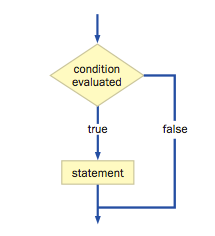
A conditional statement is sometimes called a selection statement.
Each decision is based on a boolean expression.
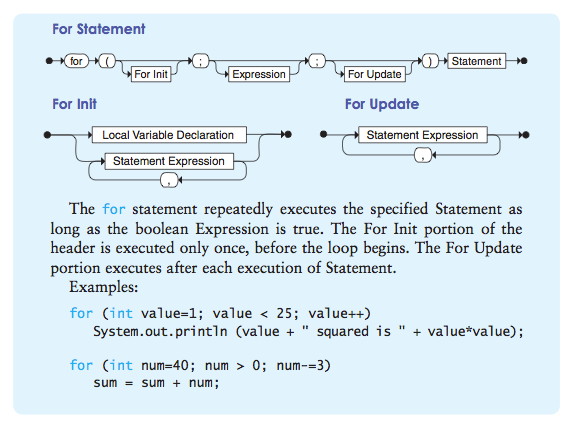
Three types of loop statements: while, do and for statements.
The if statement:
Shorthand “if” statement: a ternary operator, inline if a or ternary
y = ( x <= 0 ) ? x : -x
which is a convenient way of writing
if ( x <= 0 )
    y = x;
else
    y = -x;
Equality and Relational Operators
Nested if statements
if (a > b)
   if (a > c)
      x = a;  // a is ...
   else
      x = c;  // c is ...
else
   if (b > c)
      x = b;  // b is ...
   else
      x = c;  // c is ..
Classwork: you can use this code snippet to write a program minMax_YI.java to prompt the user for three numbers and displays them in order from smallest to largest.Write the test/driver program if you use OOD. NOTE: Assume the numbers are different. Include this assumption in your documentation.
It is a sign of unbelievably bad taste to put unrelated conditions into the loop. ( lol )
Classwork: Using the code snippet from the lesson write a program MinMax_YI.java to prompt the user for three numbers and displays them in order from smallest to largest. OOP is not required. However, write the test/driver program if you use OOD.
Assignment: Programming Project 3.2 Design and implement an application that reads an integer value representing a year input by the user. The purpose of the program is to determine if the year is a leap year (and therefore has 29 days in February) in the Gregorian calendar. A year is a leap year if it is divisible by 4, unless it is also divisible by 100 but not 400. For example, the year 2003 is not a leap year, but 2004 is. The year 1900 is not a leap year because it is divisible by 100, but the year 2000 is a leap year because even though it is divisible by 100, it is also divisible by 400. Produce an error message for any input value less than 1582 (the year the Gregorian calendar was adopted).
Reading and Writing Assignments:
Read pages 124 through 140, submit the short answers 3.1 through 3.5.
Short Answers:
3.1 What happens in the MinOfThree_YI.java program if two or more of the values are equal? If exactly two of the values are equal, does it matter whether the equal values are lower or higher than the third?
3.2 What is wrong with the following code fragment? Rewrite it so that it produces correct output.
if(total == MAX)if(total < sum)System.out.println ("total == MAX and is < sum.");elseSystem.out.println ("total is not equal to MAX");
3.3 What is wrong with the following code fragment? Will this code compile if it is part of a valid program? Explain.
if(length == MIN_LENGTH)System.out.println ("The length is minimal.");
3.4 What output is produced by the following code fragment?
int num =87, max =25;if(num >= max*2)System.out.println ("apple");System.out.println ("orange");System.out.println ("pear");
3.5 What output is produced by the following code fragment?